How it works
Privyx is an HTTP proxy. Your client sends its requests to Privyx instead of to the AI provider, and Privyx forwards them. On the way out it replaces the sensitive values it detects with placeholders; on the way back it puts the original values into the reply.
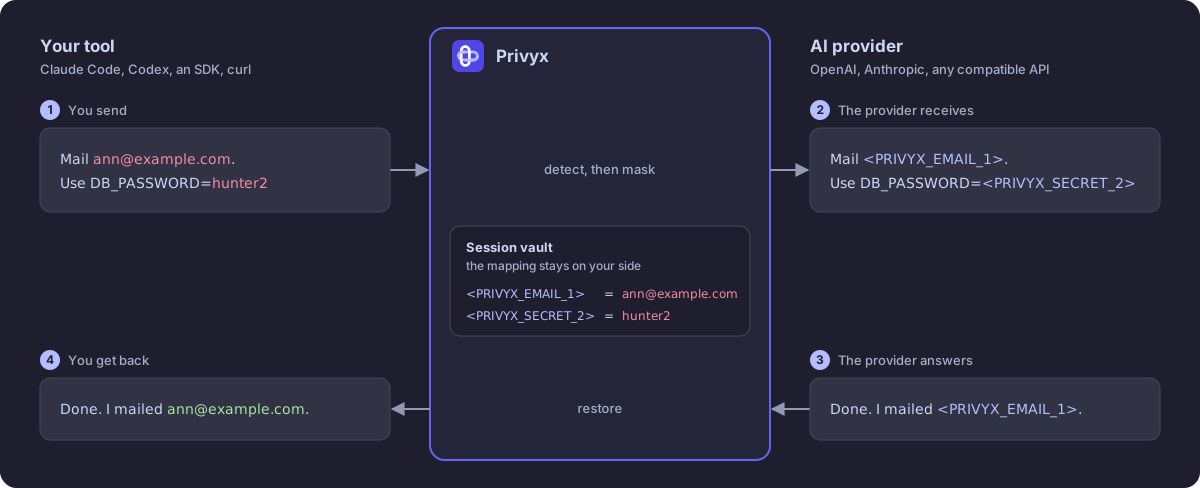
The provider works with <PRIVYX_EMAIL_1>. Your client never sees that
placeholder: it gets the address back. Nothing in the client changes except
the base URL it talks to.
One request, step by step
- Your client calls Privyx. It keeps its own API key, which Privyx relays to the provider, unless you give Privyx a key of its own.
- Privyx looks up the path.
/v1/chat/completions,/v1/messages, and/v1/responsesare in its routes, so it knows where the text of such a request is: the messages, the system prompt, tool results, tool arguments. Settings such asmodelortemperatureare left alone. - It detects and masks. The detector finds sensitive
values in each piece of text, the policy decides
which of them to mask, and the operator replaces each one,
by default with a numbered token such as
<PRIVYX_EMAIL_1>. - It remembers the mapping. Each token and the value it stands for go into a session, which Privyx keeps in its vault. The provider never receives it.
- It forwards the request. The provider receives the masked text and
answers as usual. The model can reason about
<PRIVYX_EMAIL_1>, repeat it, and pass it to a tool; it cannot read what is behind it. - It restores the reply. Every token the session issued is replaced by its original value: in the text, in reasoning, and in tool-call arguments. A streamed reply is restored as it arrives, also when a token is split between two chunks.
- It writes an audit event. The audit trail records which entity types were masked and how many, never the values.
If Privyx cannot mask a request, it does not forward it. A detector that fails, a session vault that is down, or a body it cannot read ends in an error response from Privyx rather than in an unmasked request.
What is masked, and what is not
With no configuration, Privyx detects values with a recognizable shape: email addresses, phone numbers, credit card numbers, IP addresses, US social security numbers, and secrets such as API keys, tokens, private keys, and passwords. The full list is in Detection.
A name, a company, or a project codename has no shape to recognize. For those you give Privyx a word list, or add a detector that understands language (Presidio or an LLM).
Only the chat requests in proxy.routes are masked. Any other path, such as
embeddings, is forwarded as the client sent it, unless you tell Privyx to
refuse those paths. Limitations lists everything
Privyx does not cover.
Three ways to use it
| Command | What it does | Use it when |
|---|---|---|
privyx run TOOL |
Starts a proxy on a free port, launches the tool pointed at it, and stops the proxy when the tool exits | You use a coding agent such as Claude Code, Codex, or aider |
privyx proxy |
Runs the proxy until you stop it | An application, several tools, or a team share one proxy |
privyx mask / unmask |
Masks and restores a string, a file, or JSON, without a proxy | You prepare data in a script or a pipeline |
All three use the same engine and the same configuration, so
privyx detect shows on a sample text what any of
them would mask.
The vocabulary
These terms come back throughout the documentation.
Entity
One kind of sensitive value, named in upper case: EMAIL, PHONE, API_KEY,
or a name of your own such as PROJECT. The entity type is part of the token,
so the model still knows what kind of value it is looking at.
Detector
The component that finds entities in text. regex, the default, uses the
built-in patterns plus your own patterns and word lists. presidio and llm
find names and other values that only make sense in context. Several
detectors can run together. See Detection.
Policy
The filter between detection and masking. default masks everything the
detector found; strict masks only the entity types you list. See
Policy.
Operator
What a detected value becomes. pseudonym, the default, writes a token.
hash, encrypt, faker, and redact trade readability, reversibility,
and what the vault stores in different ways. See Masking.
Token
The placeholder that replaces a value, also called a pseudonym:
<PRIVYX_EMAIL_1> is the first email address a session saw. The syntax is
configurable.
Session
The mapping from each token to the value it replaced. A request and its reply share one session; whether the next request shares it too is the session strategy.
Vault
Where sessions are kept: in memory (the default), in a SQLite file, or in Redis. See Vault backends.
Anchor
An optional secret that derives a token from the value itself, so the same value gets the same token in every session and after a restart. See Anchors.
Route and wire schema
A route maps a request path to the JSON shape of its body: openai (Chat
Completions), anthropic (Messages), or responses (OpenAI Responses).
Privyx masks a request only when its path has a route. See
Proxy modes and routes.
Transparent and gateway mode
The two ways the proxy forwards a request. transparent, the default,
mirrors the client's path on the provider's host. gateway posts every
request to one fixed URL, for a provider whose endpoint sits behind a base
path. See Two modes.
Audit trail
A log of what Privyx did, one JSON object per line: event names, entity types, and counts, without any request or reply content. See Audit events and metrics.
Next steps
- Quickstart: run it for the first time.
- Tutorials: one complete walkthrough per use case.
- Threat model: what Privyx protects against.